
How Sunrise is built
Sunrise is one DLL. The game loads it in place of its Steam API library. Inside the game process it is two things at once: a client mod that hooks the game, and a local server that answers the game’s network traffic. Nothing leaves the machine unless you point it at an external server.
How the game loads it
The build output is named steam_api64.dll (the TargetName in Sunrise.vcxproj). It sits in
bin/x64 beside the game executable. The game loads it like the real Steam library and calls its
exports.
Sunrise implements those exports itself in src/dllmain.cpp. The game calls three of them at the
points that matter:
| export | what Sunrise does there |
|---|---|
SteamAPI_Init | starts Sunrise: settings, logging, state, server and client setup |
SteamAPI_RunCallbacks | runs every frame: attaches hooks, delivers Steam callbacks, runs client work |
SteamAPI_Shutdown | stops everything in reverse order |
The other SteamAPI_* and SteamInternal_* exports answer the game’s Steam questions locally:
user, language, callbacks, interfaces. The code is in src/steam/.
The DLL also exports SunriseInitialize, SunriseActivateClient and SunriseShutdown. They run
the same startup and shutdown steps for a host that loads the DLL another way.
The layers
Sunrise has six layers. Each one is a top-level folder under src/. Third-party code is in
vendor/: Detours for hooks, Dear ImGui for the menu, and Lua for mission scripts.
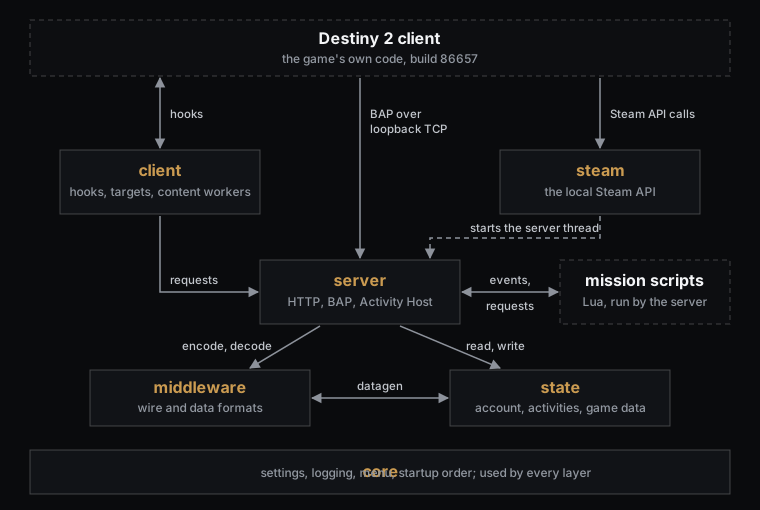
Everything in the graph runs in the game process. The game reaches Sunrise three ways: through the
client’s hooks, through Steam API calls, and over a real TCP connection to the server’s BAP
listener on loopback. The client hands its requests to the server through consumer.h.
| layer | what it holds |
|---|---|
src/core | the base every layer uses, and the startup order |
src/steam | the local Steam API the game loads |
src/client | everything that touches the game’s own code |
src/middleware | the game’s wire and data formats, as encoders and decoders |
src/state | what the server knows: the account, the activities, the game data |
src/server | the local server that answers the game |
Core
Core holds the parts with no game knowledge.
| folder | what it owns |
|---|---|
settings/ | reads and checks settings.json, one part per layer |
logging/ | the log sinks, the line format and the in-memory log view |
filesystem/ | the Sunrise folder and the paths under it |
threading/ | lock helpers |
ui/ | the menu and HUD framework: layout, theme, fonts, overlays, world markers |
runtime/ | the startup and shutdown order across all layers |
core/runtime calls each layer’s start and stop in order. See Startup order.
Steam
The game loads Sunrise as its Steam library, so Sunrise must answer every Steam call itself.
| folder | what it owns |
|---|---|
interfaces/ | the Steam interfaces the game asks for: apps, DLC, app ticket, friends, matchmaking, rich presence, user stats, networking |
runtime/ | the exports, the callback queue, and the per-frame pump |
The per-frame pump is where the client layer attaches and the server thread starts.
Client
The client layer is the only layer that reads or changes the game’s code.
| folder | what it owns |
|---|---|
patterns/, targets/ | find game functions by byte pattern and keep the resolved addresses |
hooks/ | every hook; see Client hooks |
network/ | consumer.h, the request types the hooks hand to the server |
content/ | workers that read the installed packages and build caches and the activity SDK |
movement/, player/ | the saved values of the Movement and Player pages, and the player position |
ui/ | the Movement, Player and Activity Launcher menu pages |
runtime/ | installs the hooks in groups and removes them at shutdown |
A hook does not answer the game itself. It turns the game’s call into a request, and the server answers it. The rule for hooks that change game behavior is on Client hooks.
Middleware
Middleware is the game’s formats, written as code. It encodes and decodes. It does not decide what to send.
| folder | what it owns |
|---|---|
signon/ | the SignOn request and response |
bap/ | BAP frames, the service catalog and every service body, including the activity messages |
secure_channel/, crypto/ | the encrypted BAP frame and the ciphers it needs |
web_service/ | the ws RPC envelope and one codec per opcode |
queuez/ | the service 123 update body |
datagen/ | builds the game’s account, character and roster records from Sunrise’s state |
protobuf/, encoding/, compression/ | protobuf, the bit-packed codec, and Oodle |
content/ | the package reader, named tags and the package tables |
gameplay/ | the peer transport: association, DTLS records, NAT, peer and group messages |
The formats are described in the Destiny 2 section.
State
State is what the server knows about the world. It holds facts, not protocol.
| folder | what it owns |
|---|---|
account/, investment/ | the account, its characters and items, and the SQLite store |
equipment/, progression/, unlocks/, entitlements/ | equipped gear and light, progress, unlock flags, owned content |
activity/ | activity sessions, bubbles, membership, entity slots and destinations |
activity_sdk/ | the generated activity SDK that mission scripts read |
build_data/ | game data read from the installed packages: items, activities, vendors, records and more |
content_manifest/ | the scan of the installed packages, and its cache |
matchmaking/, gameplay/, steam/ | matchmaking config, replicated entity state, local Steam data such as rich presence and achievements |
runtime/ | starts the state, and holds the per-run values such as session tokens |
How the account is stored is on Accounts, characters and saves.
Server
The server answers the game. It reads requests, asks state, and uses middleware to write answers.
| folder | what it owns |
|---|---|
http/ | the SignOn answer |
transport/ | the BAP listener: a nonblocking TCP socket on loopback, 8 slots |
bap/ | one session per connection, the plaintext and encrypted routes, and every push |
web_service/ | the ws RPC handlers: equip, dismantle, vendors and the rest |
activity/ | the Activity Host and the mission script runtime |
gameplay/ | the gameplay UDP endpoint and its peer protocol |
runtime/ | the server thread and its service slice |
ui/ | the Activity Host menu page and its World and Packets windows |
See The Activity Host and Mission scripting.
How the layers depend on each other
The main direction is one way: the server uses middleware and state, and everyone uses core.
| layer | uses |
|---|---|
| core | the other layers only in three places: core/runtime starts them, settings/ parses into state types, and the HUD overlays read their status |
| steam | core; it starts the server thread and the client activation |
| client | core, middleware and state; the server only as noted below |
| middleware | core and state |
| state | core, and a few middleware helpers |
| server | core, middleware, state, and the client’s request types |
Three links cross the main direction:
- Middleware and state use each other.
datagenreads the account from state to build the game’s records. State uses a few middleware parts, such as the loadout resolver and SHA-256. - The client reaches the server in two places. It registers an investment consumer with the BAP server at start, and one world-marker renderer reads the current activity link.
- The server uses client UI code. The Activity Host windows draw world markers with the client’s marker code.
Everything else between client and server goes through the request types in
src/client/network/consumer.h.
The files Sunrise writes
Sunrise keeps its files in one folder, Sunrise, beside the DLL. For a normal install that is
bin/x64/Sunrise/. The path code is in src/core/filesystem/path.cpp.
| path | what it holds |
|---|---|
settings.json | the settings; see Settings, logs and in-game tools |
logs/sunrise.log | the log, when the file log is on |
cache/ | caches built from the installed packages |
data/investment.sqlite3 | the persistent SQLite database |
sdk/ | the generated activity SDK, with sdk/catalog.bin and sdk/lua/ |
scripts/ | your mission scripts |
movement.json, player.json, hud.json, world_markers.json | values saved by the menu pages |
Startup order
Startup is split in two. SteamAPI_Init builds all process state, but installs no game hooks. The
first calls to SteamAPI_RunCallbacks then attach to the game.
This is the order in src/steam/runtime/steam_lifecycle.cpp, src/core/runtime/core_runtime.cpp,
src/server/runtime/server_runtime.cpp and src/steam/runtime/callbacks/callback_dispatch.cpp,
with logging and error paths left out.
/* SteamAPI_Init -> steam::initialize */
if (running_under_wine) initialize_wine_display();
egress::install();                 /* socket and name-lookup redirect, before anything connects */

core::initialize(module):          /* each step must succeed, or every earlier one is undone */
    settings::initialize();        /* reads Sunrise/settings.json */
    log::initialize();             /* opens the sinks */
    ui::runtime::initialize();     /* menu visibility and toggle key */
    hud::initialize(); logs::initialize();     /* the two Core menu pages */
    initialize_state();            /* database, account, build data */
    initialize_content_manifest(); /* reads the installed packages, then the activity SDK */
    middleware::initialize();      /* package name catalog, first boot only */
    server::initialize():
        register_http_consumer(http::consume);
        register_bap_consumer(bap::consume);
        transport::initialize();   /* BAP listener on 127.0.0.1:bap_port; a failure only warns */
        gameplay::initialize();    /* gameplay UDP endpoint; a failure only warns */
        server_ui::initialize();   /* Activity Host page */
    client::initialize();          /* SDK worker setup, saved page values, client pages */

package_trust::install();          /* must attach before the base packages register */
bootflow_texture_override::install();

/* SteamAPI_RunCallbacks -> run_slice, every frame */
activate_graphics_once();          /* presentation, cursor and input hooks */
if (main_activation_pending()) { show_busy_overlay(); return; }  /* one frame to draw it */
main_ok = activate_main_once();    /* scan the game image, install the network and feature hooks */
deliver_queued_steam_callbacks();
if (main_ok) {
    apply_feature_flags_once();
    start_server_thread_once();    /* from here the server has its own thread */
    service_client_workers();      /* investment, SDK generation, scriptables */
}
If a step of core::initialize fails, the log gets ev=initialize stage=<step> result=fail. If the
image scan fails, the screen shows “Sunrise could not attach to the game. The boot will not finish.”
Threads
The server never runs on the game’s frame. The game can block on a loopback send until the server answers, so the game must not be the server’s clock.
| thread | what runs on it |
|---|---|
the game thread that calls SteamAPI_RunCallbacks | hook activation, Steam callback delivery, and the client content workers’ service calls |
| the server thread | one service slice every 10 ms: BAP transport, Activity Host, mission scripts, gameplay endpoint |
| the game thread that sends an HTTP request | the SignOn answer, built in place by server::http::consume |
The server thread is started once, from start_server_thread_once in
src/steam/runtime/callbacks/callback_dispatch.cpp, on the first frame after the image scan
succeeds. Its loop is:
for (;;) {
    Sleep(10);
    server::service(GetTickCount64());
}

void server::service(uint64_t now) {
    transport::service(now);           /* accept, read, route frames, write answers */
    activity::host::service(now);
    activity::mission::service(now);   /* mission scripts */
    gameplay::service(now);
}
Each stage is timed. A stage over 40 ms logs ev=core stage=service result=slow step=<stage>.
Every 2 seconds a debug line reports the worst times of the window.
SteamAPI_RunCallbacks wraps its work in a structured exception handler. A fault inside it is
logged on the next call as ev=core stage=pump result=fault code=0x..., so one fault does not stop
every later frame.
How a request reaches the server
The game expects remote servers. Sunrise catches that traffic at two points and answers it in the same process.
Sockets and name lookups
The egress hooks in src/client/hooks/egress/ replace the Winsock connect and send calls and the
name resolvers. Every IPv4 destination keeps its port but gets its address replaced with the
redirect target. The target is 127.0.0.1, or client.external_server.host when the external
server is on. A connect the policy cannot redirect fails with WSAEACCES.
HTTP: SignOn
The game sends HTTP through one shared executor. Sunrise replaces it
(src/client/hooks/network/http/). For each request:
if (external_server.enabled) {
    rewrite_url_host(descriptor);      /* send it to the external server */
    return original_executor(descriptor);
}
if (descriptor.operation != POST) return refuse_unmapped(url);
HttpRequest request = { url, content_type, body, response_buffer };
if (!http_consumer(&request, &response)) return refuse_unmapped(url);
publish_completion(response.size, response.status);
return SKIP_NATIVE_OPERATION;          /* the game's own transport never runs */
The server’s HTTP consumer (src/server/http/server_http.cpp) answers one route: a URL that
contains /SignOn. The hook refuses any other URL and logs ev=http stage=route result=unmapped.
The SignOn answer carries the BAP port from server.bap_port.
BAP
The game then opens a TCP connection for BAP. The egress hook sends it to 127.0.0.1, where the
server’s listener (src/server/transport/bap_listener.cpp) waits on the BAP port.
On each server slice the listener:
- Accepts a waiting connection into a free slot. There are 8 slots.
- Reads what the socket has.
- Splits the stream into frames and passes each one to
bap::consume. - Writes the answer back.
- On a poll tick, asks the session whether it owes a push.
bap::consume (src/server/bap/bap_route.cpp) takes four events: open, frame, poll and
close. A frame is parsed, then routed to the plaintext or the encrypted handler of that
connection’s session. Its scratch buffer is wiped after every call.
struct BapRequest {
    BapEvent event;              /* open, frame, poll or close */
    uint32_t connectionId;       /* one per listener slot */
    span<const byte> frame;      /* inbound bytes, for a frame */
    span<byte> response;         /* caller-owned output buffer */
};
These types are in src/client/network/consumer.h. Every request from a hook to the server goes
through them. The two other client-to-server links are listed in
How the layers depend on each other.
Gameplay traffic
In-activity gameplay uses UDP. With server.gameplay.topology set to embedded, the server binds
its own UDP endpoint (src/server/gameplay/endpoint/). The port settings are on
Settings, logs and in-game tools.